Endpoint Architecture
Digital Rebar Provision is provided by a single binary that contains tools and images needed to operate. These are expanded on startup and made available by the file server services.
Services
Provisioning requires handoffs between multiple services as described in the workflows section. Since several of services are standard protocols (DHCP, TFTP, HTTP, HTTPS), it may be difficult to change ports without breaking workflow.
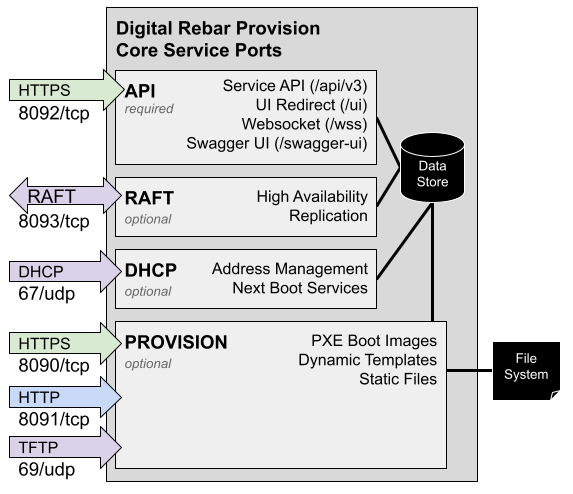
The figure below illustrates the four core Digital Rebar Provision services including protocols and default ports. The services are:
- API - These services provide control for the other services
- Service API: REST endpoints with Swagger definition
- UI: User interface redirect and local UX
- Websocket interface
- Swagger UI interface
- DHCP: Address management includes numerous additional option fields used to tell systems how to interact with other data center services such as provisioning, DNS, NTP and routing.
- Provision: sends files on request during provisioning process based
on a template system:
- TFTP: very simple (but slow) protocol that is used by firmware boot processes because it is very low overhead.
- HTTP: faster file transfer protocol used by more advanced boot processes
- HTTPS: faster file transfer protocol used by more advanced boot processes
- RAFT: Synchronization and High Availability Support
- RAFT: Consensus protocol for maintaining state with the high availability cluster.
Ports
The table describes the ports that need to be available to run Digital Rebar Provision (DRP). Firewall rules may need to be altered to enable these services. The feature column indicates when the port is required. For example, the DHCP server can be turned off and that port is no longer required.
| Ports | Feature | Usage |
|---|---|---|
| 53/udp | DNS | DNS Port |
| 53/tcp | DNS | DNS Port |
| 67/udp | DHCP | DHCP Port |
| 69/udp | PROV | TFTP Port |
| 4011/udp | BINL | PXE/BINL port |
| 8080/tcp | Metrics | Prometheus Metrics |
| 8090/tcp | PROV | HTTPS-base Dynamic File Server |
| 8091/tcp | PROV | HTTP-base Static File Server |
| 8092/tcp | Always | HTTPS API and Swagger-UI |
| 8093/tcp | RAFT | High Availability Protocol |
All default ports can be changed at start up time of the dr-provision
service. NOTE that changing DNS, DHCP and TFTP ports has wide ranging
implications and is likely not a good idea (many firmware
implementations can not be changed to use alternate port numbers).
Port access requirements:
In all provisioning usage cases (53, 67, 69, 4011, 8090, 8091, and 8092) the ports from the Machines being provisioned to the DRP Endpoint must be accessible. The DRP Endpoint must be able to reach the Machines being provisioned on port 67. In addition, the API and Swagger-UI port must be accessible to any operator/administrator workstations or systems that are controlling and managing the DRP Endpoint service. Additionally, any services or integrations that interact with the DRP Endpoint (eg IPAM, DCIM, Asset Management, CMS, CMDB, etc) may need access to the API port. BINL is an optional protocol and only needed if you are using it in place of PXE.
If you are running drpcli info status or drpcli info check from
another host, make sure firewall rules are in place to allow
communication between both the host and the endpoint as both commands
check all ports on the DRP endpoint.
Optionally, the DRP Endpoint MAY use the HTTPS (443/tcp) or SSH port (22/tcp) to connect to machine remotely. This is an OUTBOUND port usage. It is a common usage for Terraform and Ansible execution from the DRP Endpoint.
Within an HA cluster, the DRP Endpoints MUST be able to bi-directionally communicate over the RAFT port. HA is an optional configuration.
Additionally, the DRP Endpoint can export Prometheus metrics, and by default metric service will run on port 8080. If you wish to scrape DRP metrics, you will need to accommodate this port as well.
Endpoint Firewall Configuration Examples
iptables
Here is an example of Linux based IPTables firewall rules. Note that you
may need or be required to restrict the source IP addresses
appropriately for your operational security requirements. For example,
the Machines that will be provisioned need access to all ports, and
an administrator/operator may need access to the API port for control
plane of the DRP Endpoint(s). You will need to adjust the input
interface (-i eno3) appropriately for your system.
 # a vague attempt to make this roughly reusable...
 INTERFACE=eth0
 PORT_DHCP=67:68
 PORT_DNS=53
 PORT_TFTP=69
 PORT_SFILE=8090
 PORT_FILE=8091
 PORT_BINL=4011
 PORT_PROV=8092
 PORT_PROM=8080
 PORT_RAFT=8093
 SOURCES=""       # add appropriate "-s IP/netmask" etc statements here

 # for local connectivity
 iptables -A INPUT -i lo -p tcp -m tcp --dport $PORT_FILE -j ACCEPT
 iptables -A INPUT -i lo -p tcp -m tcp --dport $PORT_SFILE -j ACCEPT
 iptables -A INPUT -i lo -p tcp -m tcp --dport $PORT_PROV -j ACCEPT

 # adjust input interface appropriately
 iptables -A INPUT -i $INTERFACE $SOURCES -p udp --dport $PORT_DNS -j ACCEPT
 iptables -A INPUT -i $INTERFACE $SOURCES -p tcp -m tcp --dport $PORT_DNS -j ACCEPT
 iptables -A INPUT -i $INTERFACE $SOURCES -p tcp -m tcp --dport $PORT_FILE -j ACCEPT
 iptables -A INPUT -i $INTERFACE $SOURCES -p tcp -m tcp --dport $PORT_SFILE -j ACCEPT
 iptables -A INPUT -i $INTERFACE $SOURCES -p tcp -m tcp --dport $PORT_PROV -j ACCEPT
 iptables -A INPUT -i $INTERFACE $SOURCES -p udp --dport $PORT_BINL -j ACCEPT
 iptables -A INPUT -i $INTERFACE $SOURCES -p udp -m udp --sport $PORT_DHCP --dport $PORT_DHCP -j ACCEPT
 iptables -A INPUT -i $INTERFACE $SOURCES -p udp --dport $PORT_TFTP -m state --state NEW,ESTABLISHED -j ACCEPT
 iptables -A INPUT -i $INTERFACE $SOURCES -p tcp -m tcp --sport $PORT_RAFT -j ACCEPT
 iptables -A INPUT -i $INTERFACE $SOURCES -p tcp -m tcp --dport $PORT_RAFT -j ACCEPT
If your DRP Endpoint is listening on multiple network interfaces, you will need to adjust these rules appropriately.
firewalld
As root run the following command to enable all possible services used by DRP. Similar to the iptables instructions, it's important to consider security implications when enabling any of these ports.
firewall-cmd --permanent --add-port=8090-8093/tcp --add-port=67-69/udp --add-port=4011/udp --add-port=8080/tcp --add-port=53/tcp --add-port=53/udp
Guacamole Tunnel
The remote console proxies a machine's console through the endpoint, so an operator with no network path to the machine can open it from the portal. The browser opens a websocket to the API on 8092; the endpoint resolves the target and credentials from machine parameters and hands them to a local Guacamole service (guacd), which makes the final ssh, vnc or rdp connection. guacd listens on 4822 on the host loopback only, so that port is never opened.
Remote Console Network Path lists every connection with its port, direction and credential. Remote Console covers the parameters each console type needs.