Runner Modes
This section describes the modes of execution of the Runner and how they provide different types of execution. A runner can only be in Workflow or Work Order mode at a time, and a Work Order can itself run in either a one-shot task mode or a workflow mode. In practice this gives three ways work is executed:
- Workflow Mode: DRP-driven, task-by-task pipeline execution for building machines.
- Work Order (task mode): Queued, one-shot operational actions outside the provisioning lifecycle.
- Work Order (workflow mode): Multi-phase, restartable pipeline execution carried in the Work Order object.
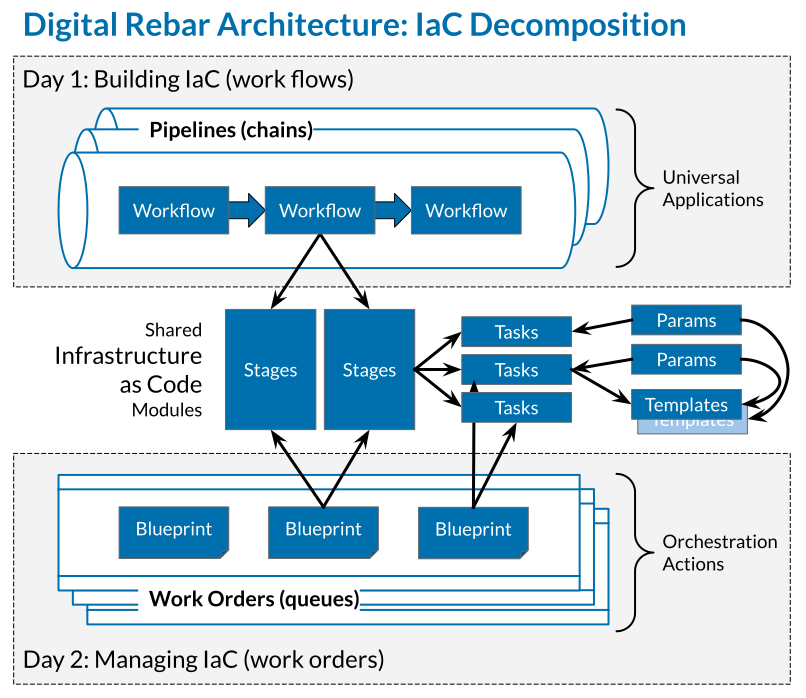
Workflow Mode
Workflow Mode is the default runner execution model, used for building machines through provisioning pipelines. All DRP content packs, Pipeline Elements, and the universal workflow system run in this mode.
The machine runner agent requests the next task by creating a Job via the DRP API, executes it locally, and reports the result, repeating for every task in the workflow. When no tasks remain, it waits on a DRP event stream until the machine becomes runnable again (for example after a stage or bootenv change, or when new work is queued), then resumes.
Because each task is a separate Job request, DRP controls task sequencing throughout the run. It can inspect machine state between every task: parameters set by one task can influence later task selection, classification stages can redirect the machine to a different workflow mid-execution, and an operator can pause, retry, or redirect machines at individual task granularity.
Work Order Mode
Work Order Mode is the alternative runner mode. Rather than following a Workflow, the runner pulls Work Orders from a queue and runs each one's task list, supplied directly or expanded from a Blueprint. The runner pulls the next Work Order when the current one finishes, so Work Orders can be queued to represent pending work. No Workflow object is involved.
A Work Order itself runs in one of two modes, set by its Mode field. The naming overlaps, so keep the two levels distinct: "Workflow Mode" above is a runner mode, while a Work Order's workflow value below is a Work Order mode.
-
task(default): One-shot, non-restartable execution. Once the Work Order fails, finishes, or is cancelled it cannot be restarted, and no chaining occurs between Work Orders; the runner simply drains the queue. Its Blueprint expands to a plain task list with no Pipeline, Workflow, or Context, and there is nouniversal-chain-workflowtask. This mode suits work that is not part of building a machine: operational tasks, audits, remediation actions, or anything queued independently of the provisioning lifecycle. -
workflow: Multi-phase, restartable execution. The Work Order drives a machine through the pipeline phases (prepare, discover, hardware, os, and app) while retaining the Work Order object model. Unlike task mode, it builds machines and chains across phases, combining pipeline-style provisioning with the queued, asynchronous Work Order lifecycle. It is described in detail below.
Work Orders in Workflow Mode
A Work Order in workflow mode bridges the two runner models: it brings Pipelines and multi-phase execution into the Work Order object, so provisioning work can be queued and managed like any other Work Order.
-
Blueprint binding: A Blueprint used by a Work Order in workflow mode may set
Pipeline,Workflow, andContext. Applying the Work Order setsMachine.Pipelineto the Blueprint's Pipeline; the entryWorkflowdefaults touniversal-pipeline-startwhen not overridden. -
Phase tracking: A Work Order in workflow mode records the timed sequence of phases it traversed in its
PipelinePhaselist. The server writes these records as the machine's workflow advances; they are not appended by content tasks. -
Restart via successor: Unlike task mode, a Work Order in workflow mode can be restarted. An operator restarts a failed Work Order with
POST /work_orders/{uuid}/restart, choosing a mode ofretry,continue, orfrom-start. This spawns a successor Work Order whosePredecessorfield references the one it supersedes, forming a chain that represents a single pipeline run across restarts. Batch-owned Work Orders are restarted at the batch level instead, withPOST /batches/{uuid}/restart. -
Failure handling: The
OnFailurefield controls behavior when a job fails.stop(default) is terminal, andpausehalts the run until an operator triggers a restart; both leave the failed Work Order in place so it can be restarted or cancelled. The valuescontinueandretryare reserved for automatic successor spawning and currently behave asstop.OnFailureis required for a Work Order in workflow mode.
Workflow Mode
Workflow Mode is the default runner execution model. The machine runner agent connects to DRP, requests the next task by creating a Job via the DRP API, executes the task locally, reports the result, and requests the next task. This request-execute-report cycle repeats for every task in the workflow.
DRP remains in control of task sequencing at all times. Each task is tracked as a Job object with its own log and exit status. DRP can inspect machine state between every task — parameters set by one task can influence subsequent task selection, classification stages can redirect the machine to a different workflow mid-execution, and an operator can pause, retry, or redirect machines at individual task granularity.
Workflow Mode is used for building machines through provisioning pipelines. All DRP content packs, Pipeline Elements, and the universal workflow system use Workflow Mode.
Work Order Mode
Work Order Mode removes workflows from the execution model entirely. Instead of a workflow, a Work Order contains the task list to be executed — either as a direct task list or as a Blueprint reference that expands to a task list. The runner pulls the next Work Order when the current one completes, allowing Work Orders to be queued and represent pending work.
Unlike Workflow Mode, no chaining occurs between Work Orders. The runner simply processes the queue. Work Order Mode is designed for actions that are not part of building a machine — operational tasks, audits, remediation actions, or any work that should be queued independently of the machine's provisioning lifecycle.
Key differences from Workflow Mode:
- Work Orders replace workflows — no Workflow object is involved
- No stage chaining or
universal-chain-workflowtask - Work Orders can be queued; the runner drains the queue
- Pipelines are not used in Work Order Mode